Join
Combines fields from two or more tables by matching related records using a common key. (This is different than stack which stacks the records of two inputs on top of each other). To help understand the concept of Join, you may wish to scroll down to see an Example of a Left Join.
Getting Started
We are going to assume you are familiar with a left join. If not, scroll down to read about Join Types or the Example of a Left Join.
When left joining two tables, you'll need to specify how to match the records from each input. Do this with the "match" property. Match explains how to align the left and right input records.
{
    "match": "left.category_id == right.id"
}
Next, you may want to specify which fields should be included from each input. By default, all fields from both inputs are included. But keeping everything from both can create a meta error if both inputs have a field with the same name.
It may be easiest to just drop any conflicting field names:
{
    "match": "left.id == right.id",
    "drop": [
        "right.id" // we need to drop right.id because left already has an "id"
    ]
}
Alternatively, you may wish to just specify exactly which fields to keep. Use an input qualifier ("left" or "right") if the field name is ambiguous. The input qualifier will be dropped from the final name, meaning that "left.id" will be named "id" in the final joined output.
{
    "match": "left.id == right.id",
    "keep": [
        "left.id", // using input specifier "left" since "id" exists in both
        "q1", // "q1" should exist in only one input file. The evaluator will find it.
        "q2",
        // etc.
    ]
}
To keep all fields from one input and a subset from the other, use the wildcard:
{
    "match": "left.id == right.id",
    "keep": [
        "left.*", // wilcard (include all fields from left input)
        "right.field1",
        "right.field2",
        "right.field3",
    ]
}
To rename fields, specify the keep entry as an object (with name and syntax) rather than a string:
{
    "match": "left.product_id == right.id",
    "keep": [
        "left.*",

        // pull in "label" from the right input and name it "product_label":
        { "name": "product_label", "syntax": "right.label" },
        { "name": "product_price", "syntax": "right.price" },

    ]
}
Note: Specifying the keep entry as an object provides opportunity to specify additional meta such as valueLabels.
Next steps: Syntax Reference or Syntax Examples
Syntax Reference
Join Type
Optional. Determines which input records to include in output. If not specified, a "left" join will be used.
{
    "type": "left" // "left", "right", "inner" or "outer"
}
left (this is the default): Returns all records from the left input and the matched records from the right input. If no match exists, the result includes
nullfor the right input fields. It ensures all primary data from the left input is preserved, filling in missing data from the right.right: Like "left" but favors the right side.
inner: Returns only the records that have matching values in both inputs.
outer: Returns all records from both inputs, combining records where matches exist and using
nullfor missing values on either side.
Match (On)
Required. A syntax string that specifies how to match the records.
{
    "match": "left.product_id == right.id"
}
{
    // Use "match" or "on" (personal preferrence). SQL experts may prefer "on"
    "on": "left.product_id == right.id"
}
// match on multiple fields
{
    "match": "(left.category_id == right.category_id) and (left.product_id == right.product_id)",

    // Since "keep" is not specified, all input fields will be kept. This
    // will create a duplicate fields error unless we drop the conflicting fields
    "drop": [
        "right.category_id",
        "right.product_id"
    ]
}
// match with keep
{
    "match": "left.product_id == right.id",

    "keep": [
        // keep all fields from the left input:
        "left.*",

        // pull it "label" from the right input and name it "product_label"
        { "name": "product_label", "syntax": "right.label" }
    ]
}
// match with drop
{
    "match": "left.id == right.id",

    "drop": [
        "right.id" // drop the second instance of id to prevent "duplicate fields" error
    ]
}
Alias
Optional. Assigns names for the input qualifiers, instead of the default "left", "right". For convenience only, the use of alias(es) may help syntax appear more intuitive.
{
    "alias": {
        "right": "product" // changes the "right" input qualifier to "product"
        // now input fields can be specified as "product.[fieldname]" instead of "right.[fieldname]"
    },
    // ...
    "keep": [
        "product.label",
        // ...
    ]
}
Keep (select)
Optional. Specifies which fields to keep.
- To keep everything from both inputs, omit the "keep" property altogether.
- To keep everything from one input but not the other, use the wildcard as explained below.
Since inputs may contain fields with the same name, there exists possibility of meta error. You will need to rename or drop input fields when duplicate field names exist. Oh wait, what about the matched fields?
Keep may be defined as an array. Each array entry should either be a string which represents syntax, or a meta object with at least name and syntax properties.
Syntax may need to include an input qualifier if the field exists in both inputs. For example, if both inputs have an "id" field, use "left.id" or "right.id" as the syntax. The resulting field name will exclude the input qualifier. For example "left.id" will be named "id". To keep "id" from both inputs, you'll need to rename one of them using either a meta object or by defining keep as an Object instead.
// "keep" defined as Array
{
    "keep": [
        // format: "{input qualifier}.{field name}" or "{field name}"
        "left.id", // becomes just "id"
        "left.product_id",
        "right.label",
        "units_sold",
        "price", // will fail if "price" exists in both inputs. "price" must be unique.
    ]
}
// "keep" defined as Array
{
    "keep": [
        "left.*", // includes all field from the left side using wildcard
        "right.label",
    ]
}
// "keep" defined as Array, using meta Object to rename a field
{
    "keep": [
        "left.*", // includes all field from the left side using wildcard
        { "name": "product_label", "syntax": "right.label" } // meta object
    ]
}
Keep may be defined as an Object. This layout may offer slightly simplified renaming of fields. Each property name becomes the field name. The property value is either a string representing the syntax, or a meta object.
// "keep" defined as Object
{
    "keep": {
        // format: "{name}": "{syntax using input qualifier if needed}"
        "id": "left.id",
        "product_id": "left.product_id",
        "product_label": "right.label",
        "units": "left.units_sold" // notice that renaming is possible
        "price": "price", // input qualifier omitted. this is okay if "price" exists in only one input
        "something_else": { // meta object
            "syntax": "varname",
            "valueLabels": [
                // ...
            ]
        }
    }
}
Drop
Optional. An array which specifies any fields to drop.
If a field name exists in both inputs, specify an input qualifier (e.g., "right.label").
{
    "drop": [
        "something",
        "right.something_else"
    ]
}
Example of Left Join
Consider the following input tables. We want to join in the category labels.
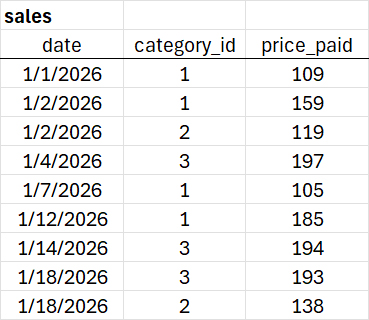
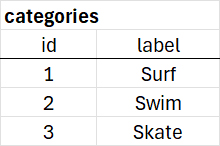
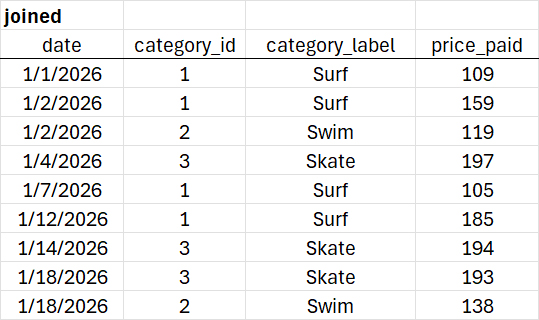
We'll use a left join on sales.category_id == categories.id
// left join example
{
    "match": "left.category_id == right.id",
    "keep": [
        "date",
        "category_id",
        { "name": "category_label", "syntax": "right.label" }, // pull in right.label and rename it
        "price_paid"
    ]
}
Syntax Examples
{
    "match": "left.forecast_name == right.name"
}
// joining a restructured survey data file with the original full file
{
    "alias": { "left": "brand_eval", "right": "survey_full" }
    "match": "brand_eval.respid == survey_full.respid",
    "keep": [
        "brand_eval.uid",
        "brand_eval.brand_id",
        "survey_full.q1",
        "survey_full.age",
    ],
}
// somewhat SQL-like syntax
{
    "type": "left", // perform left join
    "alias": { "right": "location" }, // alias the right table as "loc"
    "on": "left.loc_id == location.id" // join on clause
    "select": [
        "left.*",
        "location.description",
        "location.lat",
        "location.long"
    ]
}
Old Syntax (deprecated)
// old syntax (deprecated)
{
    // join type is always "left" in old syntax
    "localField": "category_id", // field from A (left)
    "foreignField": "id" // field from B (right)
}